
Google Voice
Google LLCCommunication
4.1117.00K Reviews
- Version
- 2026.11.01.1019342246
- Installs
- 10.00M
- Age Rating
- Everyone
Screenshots
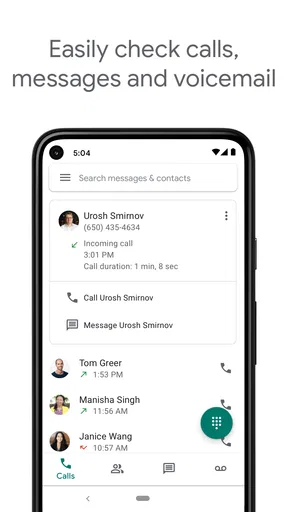
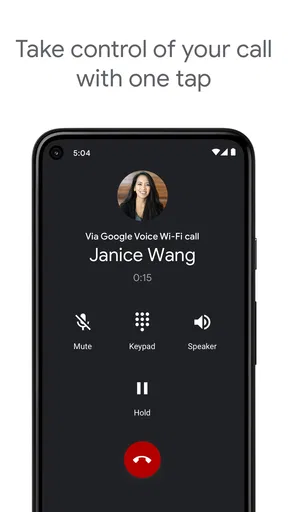
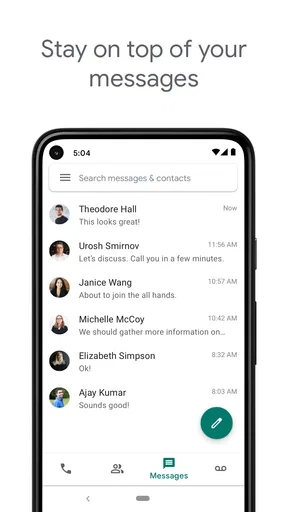
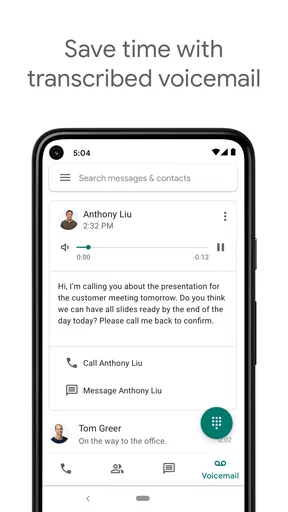
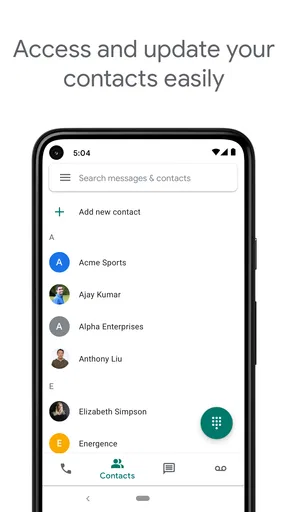
Our Review of Google Voice
 Analysis by Appyee
I often recommend a second number when someone wants to separate calls without carrying another phone, and Google Voice is one of the more practical ways to do that. It is a communication app from Google LLC, available free, with an Everyone age rating. Its cloud-based number can give work, personal errands, or a side project a clearer boundary, though it is not a magic replacement for every mobile carrier feature. The key is deciding what you want that second identity to handle before you route calls through it.
Start with the boundary you need
Before setting anything up, I would decide who should have the Voice number and what should happen when they call. A small-business owner might use it on public listings while keeping a personal number private. Someone selling a used item could share it with a buyer, then stop using it once the transaction is over. That boundary is the real benefit: you can change how you handle the number without changing the number your friends and family already know.
The app suits people comfortable with a Google account and Google’s services. It is less compelling if you only want a new number for occasional calls and do not want another inbox to check, or if you need every call and text to behave exactly like those on your carrier’s native phone app. I would also avoid treating a cloud number as a guaranteed emergency or business-phone system; choose a service designed for those requirements if reliability and specialized controls are central to your needs.
A practical setup and daily routine
Once signed in, you can choose a number and link it to an existing phone. I would then place a test call and send a test text before sharing the number widely. That small check helps you see which device rings, where a reply appears, and whether the setup matches your expectations. If you use the number for work, make a habit of checking the app or its desktop access at the times you expect to be reachable; a second number only creates a useful boundary if you actually monitor it.
Here is a realistic example: I list a desk for sale online, share the Voice number with interested buyers, and let calls come through while I am at home. If I cannot answer, voicemail transcription lets me scan the message and decide whether to call back, rather than replaying it in a noisy room. I can reply by text from the same number and keep the exchange separate from family conversations. After the sale, I can block an unwanted caller or adjust how calls are forwarded. It is a simple workflow, but it makes a temporary interaction easier to contain.
Transcription is useful, not infallible. Names, street addresses, and noisy recordings are exactly the details I would verify by listening before acting. A good routine is to use the text as a quick preview, then play the recording whenever a message includes a commitment, a location, or a number that needs to be right. Call screening can also help you decide whether to answer, but it adds a moment of friction for legitimate callers who are in a hurry or unfamiliar with the process.
Where handoffs help—and where they complicate things
Calls and messages can move between linked devices, and the app’s cross-device syncing is handy if you switch between a phone and a computer. The handoff is not the same as having one uninterrupted conversation everywhere, though: you still need to know which account and number you are using, and to check that replies are going out from the intended identity. I find it especially worth checking before sending a work-related text from a personal device or responding quickly to a message while multitasking.
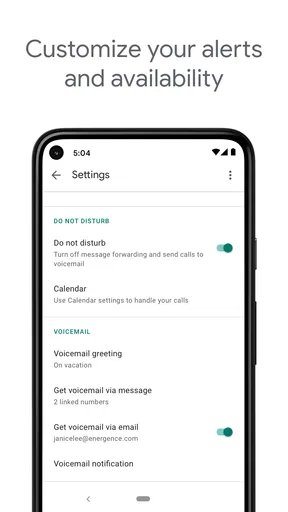
Call forwarding rules, blocking, voicemail greetings, and do-not-disturb hours let you tailor the flow. For example, a freelancer could use a distinct greeting for the number shared with clients, then silence it outside working hours. That is more deliberate than simply ignoring calls, but it takes a little upkeep: if your schedule changes, remember to adjust the quiet hours and forwarding behavior. Otherwise, a sensible boundary can become a missed call or an after-hours interruption.
Compared with a carrier’s ordinary number, Voice gives you another identity and more control over how that identity reaches you; your carrier’s number is usually simpler for everyday calling because it is already woven into the phone’s default calling experience. Compared with a dedicated business-phone service, Voice may be a lighter option for one person or a small side business, but it is not automatically the better choice for teams that need shared call handling or specialized business workflows. I would choose based on the handoff you need: personal device to computer is convenient, while colleague-to-colleague routing calls for a more purpose-built setup.
What to check before relying on it
Voice is rated 4.2 on average from around 369,000 ratings, and it has over 10 million installs. Those figures suggest it is widely used, but they cannot tell you whether its number availability or calling behavior fits your own situation. It is free, which makes trying it less of a financial commitment, but I would still test the complete path—outgoing call, incoming call, voicemail, text reply, and any forwarding you plan to depend on—before putting the number on a business card or a public profile.
Google Voice is particularly useful when the goal is separation rather than a full communications overhaul. It can help a landlord keep tenant calls apart from personal conversations, a volunteer coordinate an event, or a traveler keep a familiar contact number reachable through an internet connection. Those uses still depend on the specific setup and connection available to you, so I would keep an alternative contact route for something time-sensitive. If you need a team queue, formal customer support tools, or a service that works independently of a Google account, a specialist option is likely a better fit.
Getting Started with Google Voice
First things first – setting up Google Voice is a breeze. All you need is a Google account, and you're good to go. Once you've signed in, you can choose a phone number, which acts as your virtual identity. This number can be linked to your existing phone, meaning your calls and messages can be forwarded seamlessly. It's like having a mini phone operator in your pocket, minus the salary.
Features That Stand Out
One of the coolest features is the ability to transcribe voicemails. Yes, you read that right. No more listening to those long, rambling messages. The app transcribes them for you, and though it's not always perfect, it's pretty darn close. It's especially handy when you're in a meeting and can't take a call.
Another feature that I find super useful is the call screening option. It allows you to hear the caller's name before deciding whether to accept the call. If you're like me and prefer to avoid spam calls, this feature is a godsend.
Texting and Calling Made Easy
Texting through the app is as straightforward as it gets. You can send texts to anyone in your contacts, and the messages sync across all your devices. This cross-platform compatibility is a huge win for anyone who switches between phone and computer throughout the day.
Calls are equally simple. You can make calls using Wi-Fi, which is perfect for those times when you're in a location with spotty cell service. Plus, international calling rates are quite reasonable, so if you have loved ones abroad, this could save you a bit of cash.
Integration and Customization
Google Voice integrates with other Google services like Gmail and Calendar, which is fantastic for those of us who live and breathe the Google ecosystem. You can even set up different voicemail greetings for different callers, adding a touch of personalization to your communications.
Customization options don't stop there. You can block numbers, set up call forwarding rules, and even configure do-not-disturb hours. It's all about making the app work for you, rather than the other way around.
Security and Privacy
In today's digital age, security and privacy are more important than ever. Fortunately, Google Voice has you covered. With encryption in place for calls and messages, you can rest assured that your communications are secure. Plus, Google’s robust privacy policies mean your data is in safe hands.
The Verdict
So, is Google Voice worth it? For me, the answer is a resounding yes. It simplifies communication in such a user-friendly way, offering a range of features that cater to both personal and professional needs. Whether you're trying to keep work and personal calls separate or just want a smarter way to handle your messages, this app is a keeper.
In conclusion, if you're looking for an app that brings all your communication under one roof without making your head spin, give Google Voice a try. It's like having an assistant who never sleeps and always has your back. And hey, who wouldn't want that?
Choosing it for the right reason
The strongest case for this app is not that it replaces your phone service; it is that it gives you a separate route for selected conversations. I would use it for a public-facing number, occasional client calls, or a project that may end. I would not move every important relationship to it just because a second number is available. Keeping the original number for trusted contacts makes the distinction useful and reduces the chance that you will overlook an urgent personal call while managing the new one.
There is also a small organizational habit that pays off: name the contact or account clearly, and decide in advance which conversations belong in Voice. When a message arrives, the number itself should tell you whether it is a customer, event, or personal contact. That makes screening and call-back decisions faster. If you use several Google services already, this can feel natural; if your communication is spread across unrelated accounts, the extra destination may feel like another chore rather than a cleaner workflow.
Small decisions that prevent confusion
Think through the outgoing side as carefully as incoming calls. A second number is only useful if the person receiving your reply sees the identity you intend. Before sending a first message to a new contact, check the number shown in the conversation and keep the exchange in the same thread. This is a modest but practical safeguard when you are switching quickly between accounts or devices, especially if a personal and work conversation are happening at once.
Voicemail deserves a similar bit of setup. A greeting that identifies the purpose of the number helps callers know they reached the right place without requiring you to explain the arrangement every time. For a temporary listing or event, a neutral greeting is usually more sensible than one that reveals personal details. If the number becomes a lasting work contact, make the greeting fit that role and revisit it when the way you use the number changes.
The version listed for the app is 2026.01.25.860734784, and it requires Android 8.0 or later. I would check compatibility on the device you plan to use, particularly if an older phone is part of the handoff. That matters because the setup can be only as convenient as the device available when a call comes in. The app is intended for everyone, but the best experience still depends on whether its number, account, and device arrangement match your routine.
Privacy is also about how you use the number
Technical protections matter, but practical privacy begins with where you share the number. I would reserve it for the audience it is meant to serve rather than posting it everywhere by default. Blocking can help with an unwanted caller, yet it is better not to create unnecessary exposure in the first place. Likewise, separate greetings and quiet hours are useful signals, but neither replaces a clear decision about when you are available and which callers should have access.
For someone who fields a few predictable calls, this can be a tidy personal system. For a busy shop with several people answering, handoffs, ownership, and coverage become more important than a second number alone can solve. In that situation I would look for a business communications service built around shared responsibility instead of asking one person to forward messages manually. That distinction is why I see Voice as most convincing for individuals and modest, self-managed workflows rather than a universal phone solution.
My recommendation after weighing the trade-offs
Google Voice earns its place when you want one number to act as a buffer between your regular phone life and a specific group of callers. I like the combination of voicemail transcription, screening, forwarding controls, and access across devices, because those pieces support a complete routine rather than a number that merely looks separate. The trade-off is that you need to maintain the setup, pay attention to which identity you are using, and avoid assuming that every carrier-style or team feature will behave the way you expect.
Google LLC’s communication app has a 4.2 average from about 369,000 ratings and more than 10 million installs, so it is clearly familiar to many users. I would still judge it by a simple personal test: does the extra number make one part of your life easier to manage without creating another stream you forget to check? If yes, the free app is a sensible place to start. If you need a fully shared office phone system or want every interaction to stay inside your carrier’s standard calling experience, I would choose a different tool. For keeping selected calls and messages separate, though, I find it useful and easy to recommend.
Privacy and Permissions
See what permissions an app requests and how it handles your data.
- Identity
- find accounts on the device, add or remove accounts
- Contacts
- find accounts on the device, read your contacts, modify your contacts
- Phone
- directly call phone numbers, reroute outgoing calls, read phone status and identity
- Photos/Media/Files
- read the contents of your USB storage, modify or delete the contents of your USB storage
- Storage
- read the contents of your USB storage, modify or delete the contents of your USB storage
- Camera
- take pictures and videos
- Microphone
- record audio
- Device ID & call information
- read phone status and identity
- Other
- view network connections, pair with Bluetooth devices, change network connectivity, measure app storage space, full network access, change your audio settings, control vibration, prevent device from sleeping, read Google service configuration
Verdict
Strengths of Google Voice
- Integrates seamlessly with Google services.
- Free calls in the U.S. and Canada.
- Custom voicemail greetings available.
- Transcribes voicemails to text.
- Call forwarding to multiple devices.
Limitations of Google Voice
- Limited international calling options.
- Requires a Google account.
- Occasional transcription errors.
- No support for emergency calls.
- Lacks advanced call features.
Other Releases by Google LLC
View All
Google Calendar
Productivity4.6

Google Messages
Communication4.6

Tools4.0

Google TV
Video Players & Editors3.9
Similar Picks in This Category
View AllGoogle Messages
Google LLC4.6

Gmail
Google LLC4.1

Google Meet
Google LLC4.4

Google Chrome
Google LLC4.1

WhatsApp Messenger
WhatsApp LLC4.6

Carrier Services
Google LLC4.2
Frequently Asked Questions
What is Google Voice and how does it work?
Google Voice is a telecommunications service that allows users to make and receive calls, send text messages, and access voicemail through a single phone number. It integrates seamlessly with other Google services, providing a unified communication platform that can be accessed from multiple devices, including smartphones, tablets, and computers. Users can manage settings and preferences through the Google Voice app.
Is Google Voice free to use?
Google Voice offers a range of free features, including calling within the United States and Canada, text messaging, and voicemail services. However, international calls are subject to fees, and rates vary depending on the destination. Users can check specific calling rates on the Google Voice website. To use the service, a Google account is required.
Can I use Google Voice on multiple devices?
Yes, Google Voice is designed for flexibility and can be used across multiple devices. You can access it on Android and iOS smartphones, tablets, and computers via the web. This allows you to manage calls, texts, and voicemails from anywhere, ensuring you stay connected whether you’re at home or on the go.
What are the key features of Google Voice?
Google Voice offers various features, including call forwarding, voicemail transcription, and personalized voicemail greetings. It also supports text messaging, call screening, and the ability to block unwanted numbers. Users can also customize settings for different devices and create groups to manage contacts more efficiently.
Are there any privacy concerns with using Google Voice?
Google Voice, like other Google services, is subject to Google's privacy policies. It collects data such as call history and message content to provide the service, which may be used to improve features or for advertising purposes. Users concerned about privacy should review Google’s privacy settings and policies to understand how their data is handled.
